https://wiki.biblepay.org/index.php?action=history&feed=atom&title=RDPRDP - Revision history2026-10-10T15:16:16ZRevision history for this page on the wikiMediaWiki 1.31.12https://wiki.biblepay.org/index.php?title=RDP&diff=6956&oldid=prevAdmin at 20:15, 18 August 20242024-08-18T20:15:46Z<p></p>
<table class="diff diff-contentalign-left" data-mw="interface">
<col class="diff-marker" />
<col class="diff-content" />
<col class="diff-marker" />
<col class="diff-content" />
<tr class="diff-title" lang="en">
<td colspan="2" style="background-color: #fff; color: #222; text-align: center;">← Older revision</td>
<td colspan="2" style="background-color: #fff; color: #222; text-align: center;">Revision as of 20:15, 18 August 2024</td>
</tr><tr><td colspan="2" class="diff-lineno" id="mw-diff-left-l40" >Line 40:</td>
<td colspan="2" class="diff-lineno">Line 40:</td></tr>
<tr><td class='diff-marker'> </td><td style="background-color: #f8f9fa; color: #222; font-size: 88%; border-style: solid; border-width: 1px 1px 1px 4px; border-radius: 0.33em; border-color: #eaecf0; vertical-align: top; white-space: pre-wrap;"><div>Populate the nickname, and enter the correct 4 digit pin that the home pc requires for you to dial into it.</div></td><td class='diff-marker'> </td><td style="background-color: #f8f9fa; color: #222; font-size: 88%; border-style: solid; border-width: 1px 1px 1px 4px; border-radius: 0.33em; border-color: #eaecf0; vertical-align: top; white-space: pre-wrap;"><div>Populate the nickname, and enter the correct 4 digit pin that the home pc requires for you to dial into it.</div></td></tr>
<tr><td class='diff-marker'> </td><td style="background-color: #f8f9fa; color: #222; font-size: 88%; border-style: solid; border-width: 1px 1px 1px 4px; border-radius: 0.33em; border-color: #eaecf0; vertical-align: top; white-space: pre-wrap;"><div>Click Save.</div></td><td class='diff-marker'> </td><td style="background-color: #f8f9fa; color: #222; font-size: 88%; border-style: solid; border-width: 1px 1px 1px 4px; border-radius: 0.33em; border-color: #eaecf0; vertical-align: top; white-space: pre-wrap;"><div>Click Save.</div></td></tr>
<tr><td colspan="2"> </td><td class='diff-marker'>+</td><td style="color: #222; font-size: 88%; border-style: solid; border-width: 1px 1px 1px 4px; border-radius: 0.33em; border-color: #a3d3ff; vertical-align: top; white-space: pre-wrap;"><div><ins style="font-weight: bold; text-decoration: none;"></ins></div></td></tr>
<tr><td colspan="2"> </td><td class='diff-marker'>+</td><td style="color: #222; font-size: 88%; border-style: solid; border-width: 1px 1px 1px 4px; border-radius: 0.33em; border-color: #a3d3ff; vertical-align: top; white-space: pre-wrap;"><div><ins style="font-weight: bold; text-decoration: none;"></ins></div></td></tr>
<tr><td colspan="2"> </td><td class='diff-marker'>+</td><td style="color: #222; font-size: 88%; border-style: solid; border-width: 1px 1px 1px 4px; border-radius: 0.33em; border-color: #a3d3ff; vertical-align: top; white-space: pre-wrap;"><div><ins style="font-weight: bold; text-decoration: none;"></ins></div></td></tr>
<tr><td colspan="2"> </td><td class='diff-marker'>+</td><td style="color: #222; font-size: 88%; border-style: solid; border-width: 1px 1px 1px 4px; border-radius: 0.33em; border-color: #a3d3ff; vertical-align: top; white-space: pre-wrap;"><div><ins style="font-weight: bold; text-decoration: none;"></ins></div></td></tr>
<tr><td colspan="2"> </td><td class='diff-marker'>+</td><td style="color: #222; font-size: 88%; border-style: solid; border-width: 1px 1px 1px 4px; border-radius: 0.33em; border-color: #a3d3ff; vertical-align: top; white-space: pre-wrap;"><div><ins style="font-weight: bold; text-decoration: none;">''' Now it is setup, how do I dial my home machine from my remote machine? '''</ins></div></td></tr>
<tr><td colspan="2"> </td><td class='diff-marker'>+</td><td style="color: #222; font-size: 88%; border-style: solid; border-width: 1px 1px 1px 4px; border-radius: 0.33em; border-color: #a3d3ff; vertical-align: top; white-space: pre-wrap;"><div><ins style="font-weight: bold; text-decoration: none;"></ins></div></td></tr>
<tr><td colspan="2"> </td><td class='diff-marker'>+</td><td style="color: #222; font-size: 88%; border-style: solid; border-width: 1px 1px 1px 4px; border-radius: 0.33em; border-color: #a3d3ff; vertical-align: top; white-space: pre-wrap;"><div><ins style="font-weight: bold; text-decoration: none;">It's extremely easy to use.  From the home server or listening machine, launch BBP RDP.  Click the radio button called "Listener" so that it goes into Listening mode.</ins></div></td></tr>
<tr><td colspan="2"> </td><td class='diff-marker'>+</td><td style="color: #222; font-size: 88%; border-style: solid; border-width: 1px 1px 1px 4px; border-radius: 0.33em; border-color: #a3d3ff; vertical-align: top; white-space: pre-wrap;"><div><ins style="font-weight: bold; text-decoration: none;">Verify the button on the screen says "Listening", otherwise something is wrong.</ins></div></td></tr>
<tr><td colspan="2"> </td><td class='diff-marker'>+</td><td style="color: #222; font-size: 88%; border-style: solid; border-width: 1px 1px 1px 4px; border-radius: 0.33em; border-color: #a3d3ff; vertical-align: top; white-space: pre-wrap;"><div><ins style="font-weight: bold; text-decoration: none;"></ins></div></td></tr>
<tr><td colspan="2"> </td><td class='diff-marker'>+</td><td style="color: #222; font-size: 88%; border-style: solid; border-width: 1px 1px 1px 4px; border-radius: 0.33em; border-color: #a3d3ff; vertical-align: top; white-space: pre-wrap;"><div><ins style="font-weight: bold; text-decoration: none;">On the remote machine launch BBP RDP.  Click the Dialer radio button.  </ins></div></td></tr>
<tr><td colspan="2"> </td><td class='diff-marker'>+</td><td style="color: #222; font-size: 88%; border-style: solid; border-width: 1px 1px 1px 4px; border-radius: 0.33em; border-color: #a3d3ff; vertical-align: top; white-space: pre-wrap;"><div><ins style="font-weight: bold; text-decoration: none;">From the list of available connections, click Connect on the row for your home machine.</ins></div></td></tr>
<tr><td colspan="2"> </td><td class='diff-marker'>+</td><td style="color: #222; font-size: 88%; border-style: solid; border-width: 1px 1px 1px 4px; border-radius: 0.33em; border-color: #a3d3ff; vertical-align: top; white-space: pre-wrap;"><div><ins style="font-weight: bold; text-decoration: none;">Your grid should update and say "Network Up" otherwise something is wrong.</ins></div></td></tr>
<tr><td colspan="2"> </td><td class='diff-marker'>+</td><td style="color: #222; font-size: 88%; border-style: solid; border-width: 1px 1px 1px 4px; border-radius: 0.33em; border-color: #a3d3ff; vertical-align: top; white-space: pre-wrap;"><div><ins style="font-weight: bold; text-decoration: none;">You should also receive a popup containing the RDP address for the home machine and it will automatically be loaded onto the clipboard.</ins></div></td></tr>
<tr><td colspan="2"> </td><td class='diff-marker'>+</td><td style="color: #222; font-size: 88%; border-style: solid; border-width: 1px 1px 1px 4px; border-radius: 0.33em; border-color: #a3d3ff; vertical-align: top; white-space: pre-wrap;"><div><ins style="font-weight: bold; text-decoration: none;">(In future versions, we will add a feature so that it automatically launches the RDP client but for now please continue to do this next step).</ins></div></td></tr>
<tr><td colspan="2"> </td><td class='diff-marker'>+</td><td style="color: #222; font-size: 88%; border-style: solid; border-width: 1px 1px 1px 4px; border-radius: 0.33em; border-color: #a3d3ff; vertical-align: top; white-space: pre-wrap;"><div><ins style="font-weight: bold; text-decoration: none;">From Windows, launch "mstsc" by clicking Start | mstsc.  Paste the address from the clipboard into the address of the RDP client and click connect.</ins></div></td></tr>
<tr><td colspan="2"> </td><td class='diff-marker'>+</td><td style="color: #222; font-size: 88%; border-style: solid; border-width: 1px 1px 1px 4px; border-radius: 0.33em; border-color: #a3d3ff; vertical-align: top; white-space: pre-wrap;"><div><ins style="font-weight: bold; text-decoration: none;">At this point you should be connected to your home machine as if the network existed locally (the traffic is tunneling through a sanctuary, encrypted).  Note that not even a sanctuary can spy on the traffic as it uses </ins></div></td></tr>
<tr><td colspan="2"> </td><td class='diff-marker'>+</td><td style="color: #222; font-size: 88%; border-style: solid; border-width: 1px 1px 1px 4px; border-radius: 0.33em; border-color: #a3d3ff; vertical-align: top; white-space: pre-wrap;"><div><ins style="font-weight: bold; text-decoration: none;">more than one encrypted key combination that is impossible to spy on.</ins></div></td></tr>
</table>Adminhttps://wiki.biblepay.org/index.php?title=RDP&diff=6955&oldid=prevAdmin at 20:09, 18 August 20242024-08-18T20:09:33Z<p></p>
<table class="diff diff-contentalign-left" data-mw="interface">
<col class="diff-marker" />
<col class="diff-content" />
<col class="diff-marker" />
<col class="diff-content" />
<tr class="diff-title" lang="en">
<td colspan="2" style="background-color: #fff; color: #222; text-align: center;">← Older revision</td>
<td colspan="2" style="background-color: #fff; color: #222; text-align: center;">Revision as of 20:09, 18 August 2024</td>
</tr><tr><td colspan="2" class="diff-lineno" id="mw-diff-left-l8" >Line 8:</td>
<td colspan="2" class="diff-lineno">Line 8:</td></tr>
<tr><td class='diff-marker'> </td><td style="background-color: #f8f9fa; color: #222; font-size: 88%; border-style: solid; border-width: 1px 1px 1px 4px; border-radius: 0.33em; border-color: #eaecf0; vertical-align: top; white-space: pre-wrap;"></td><td class='diff-marker'> </td><td style="background-color: #f8f9fa; color: #222; font-size: 88%; border-style: solid; border-width: 1px 1px 1px 4px; border-radius: 0.33em; border-color: #eaecf0; vertical-align: top; white-space: pre-wrap;"></td></tr>
<tr><td class='diff-marker'> </td><td style="background-color: #f8f9fa; color: #222; font-size: 88%; border-style: solid; border-width: 1px 1px 1px 4px; border-radius: 0.33em; border-color: #eaecf0; vertical-align: top; white-space: pre-wrap;"><div>BIBLEPAY Extensions is a program that extends the functionality of the core wallet.  It is completely optional, meaning that you are not required to run this binary; you only need it if you want to use our enhanced features.  Since many of our features are cutting edge and need upgraded regularly as they are enhanced, we have created the BIBLEPAY Extensions program to automatically upgrade your optional modules, ensuring they will work as bug fixes are released.  The hierarchy of the program looks like this:  Core Wallet launches Extensions.  Extensions lists a bunch of extensions that are optional to use.  As they are listed, the program will automatically upgrade any of them that need upgraded.  To use an extension, click on the Connect button.   </div></td><td class='diff-marker'> </td><td style="background-color: #f8f9fa; color: #222; font-size: 88%; border-style: solid; border-width: 1px 1px 1px 4px; border-radius: 0.33em; border-color: #eaecf0; vertical-align: top; white-space: pre-wrap;"><div>BIBLEPAY Extensions is a program that extends the functionality of the core wallet.  It is completely optional, meaning that you are not required to run this binary; you only need it if you want to use our enhanced features.  Since many of our features are cutting edge and need upgraded regularly as they are enhanced, we have created the BIBLEPAY Extensions program to automatically upgrade your optional modules, ensuring they will work as bug fixes are released.  The hierarchy of the program looks like this:  Core Wallet launches Extensions.  Extensions lists a bunch of extensions that are optional to use.  As they are listed, the program will automatically upgrade any of them that need upgraded.  To use an extension, click on the Connect button.   </div></td></tr>
<tr><td colspan="2"> </td><td class='diff-marker'>+</td><td style="color: #222; font-size: 88%; border-style: solid; border-width: 1px 1px 1px 4px; border-radius: 0.33em; border-color: #a3d3ff; vertical-align: top; white-space: pre-wrap;"><div><ins style="font-weight: bold; text-decoration: none;"></ins></div></td></tr>
<tr><td colspan="2"> </td><td class='diff-marker'>+</td><td style="color: #222; font-size: 88%; border-style: solid; border-width: 1px 1px 1px 4px; border-radius: 0.33em; border-color: #a3d3ff; vertical-align: top; white-space: pre-wrap;"><div><ins style="font-weight: bold; text-decoration: none;">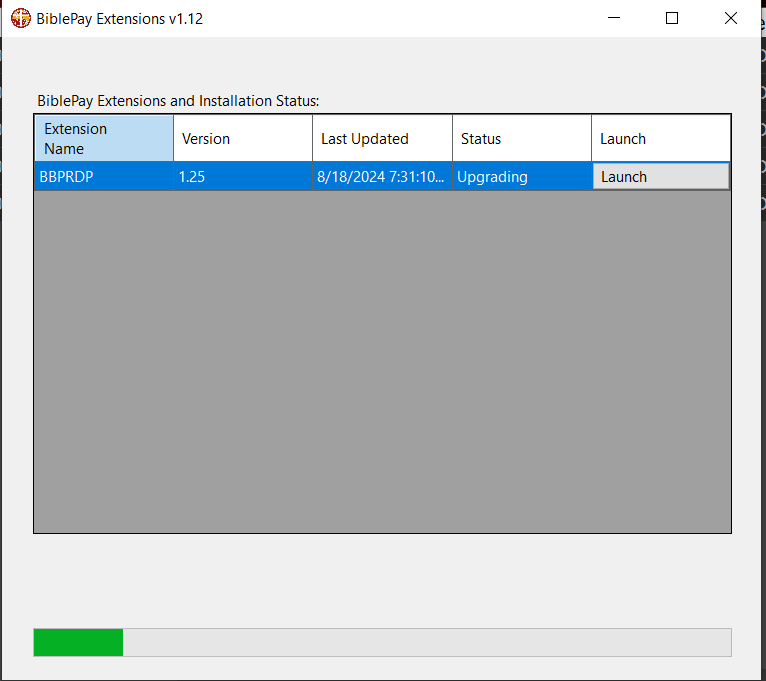</ins></div></td></tr>
<tr><td colspan="2"> </td><td class='diff-marker'>+</td><td style="color: #222; font-size: 88%; border-style: solid; border-width: 1px 1px 1px 4px; border-radius: 0.33em; border-color: #a3d3ff; vertical-align: top; white-space: pre-wrap;"><div><ins style="font-weight: bold; text-decoration: none;"></ins></div></td></tr>
<tr><td colspan="2"> </td><td class='diff-marker'>+</td><td style="color: #222; font-size: 88%; border-style: solid; border-width: 1px 1px 1px 4px; border-radius: 0.33em; border-color: #a3d3ff; vertical-align: top; white-space: pre-wrap;"><div><ins style="font-weight: bold; text-decoration: none;"></ins></div></td></tr>
<tr><td class='diff-marker'> </td><td style="background-color: #f8f9fa; color: #222; font-size: 88%; border-style: solid; border-width: 1px 1px 1px 4px; border-radius: 0.33em; border-color: #eaecf0; vertical-align: top; white-space: pre-wrap;"></td><td class='diff-marker'> </td><td style="background-color: #f8f9fa; color: #222; font-size: 88%; border-style: solid; border-width: 1px 1px 1px 4px; border-radius: 0.33em; border-color: #eaecf0; vertical-align: top; white-space: pre-wrap;"></td></tr>
<tr><td class='diff-marker'> </td><td style="background-color: #f8f9fa; color: #222; font-size: 88%; border-style: solid; border-width: 1px 1px 1px 4px; border-radius: 0.33em; border-color: #eaecf0; vertical-align: top; white-space: pre-wrap;"><div>'''How do I launch BiblePay RDP?'''</div></td><td class='diff-marker'> </td><td style="background-color: #f8f9fa; color: #222; font-size: 88%; border-style: solid; border-width: 1px 1px 1px 4px; border-radius: 0.33em; border-color: #eaecf0; vertical-align: top; white-space: pre-wrap;"><div>'''How do I launch BiblePay RDP?'''</div></td></tr>
<tr><td colspan="2" class="diff-lineno" id="mw-diff-left-l14" >Line 14:</td>
<td colspan="2" class="diff-lineno">Line 18:</td></tr>
<tr><td class='diff-marker'> </td><td style="background-color: #f8f9fa; color: #222; font-size: 88%; border-style: solid; border-width: 1px 1px 1px 4px; border-radius: 0.33em; border-color: #eaecf0; vertical-align: top; white-space: pre-wrap;"></td><td class='diff-marker'> </td><td style="background-color: #f8f9fa; color: #222; font-size: 88%; border-style: solid; border-width: 1px 1px 1px 4px; border-radius: 0.33em; border-color: #eaecf0; vertical-align: top; white-space: pre-wrap;"></td></tr>
<tr><td class='diff-marker'> </td><td style="background-color: #f8f9fa; color: #222; font-size: 88%; border-style: solid; border-width: 1px 1px 1px 4px; border-radius: 0.33em; border-color: #eaecf0; vertical-align: top; white-space: pre-wrap;"><div>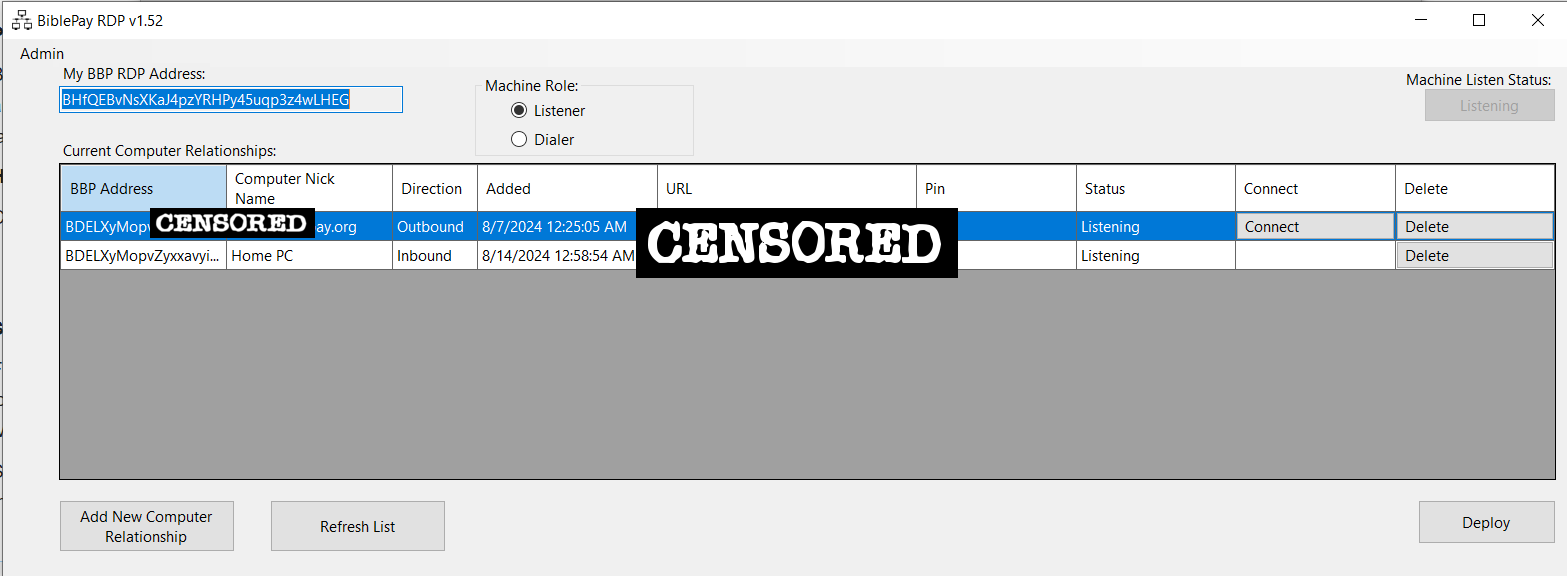</div></td><td class='diff-marker'> </td><td style="background-color: #f8f9fa; color: #222; font-size: 88%; border-style: solid; border-width: 1px 1px 1px 4px; border-radius: 0.33em; border-color: #eaecf0; vertical-align: top; white-space: pre-wrap;"><div></div></td></tr>
<tr><td colspan="2"> </td><td class='diff-marker'>+</td><td style="color: #222; font-size: 88%; border-style: solid; border-width: 1px 1px 1px 4px; border-radius: 0.33em; border-color: #a3d3ff; vertical-align: top; white-space: pre-wrap;"><div><ins style="font-weight: bold; text-decoration: none;"></ins></div></td></tr>
<tr><td class='diff-marker'> </td><td style="background-color: #f8f9fa; color: #222; font-size: 88%; border-style: solid; border-width: 1px 1px 1px 4px; border-radius: 0.33em; border-color: #eaecf0; vertical-align: top; white-space: pre-wrap;"></td><td class='diff-marker'> </td><td style="background-color: #f8f9fa; color: #222; font-size: 88%; border-style: solid; border-width: 1px 1px 1px 4px; border-radius: 0.33em; border-color: #eaecf0; vertical-align: top; white-space: pre-wrap;"></td></tr>
<tr><td class='diff-marker'> </td><td style="background-color: #f8f9fa; color: #222; font-size: 88%; border-style: solid; border-width: 1px 1px 1px 4px; border-radius: 0.33em; border-color: #eaecf0; vertical-align: top; white-space: pre-wrap;"></td><td class='diff-marker'> </td><td style="background-color: #f8f9fa; color: #222; font-size: 88%; border-style: solid; border-width: 1px 1px 1px 4px; border-radius: 0.33em; border-color: #eaecf0; vertical-align: top; white-space: pre-wrap;"></td></tr>
</table>Adminhttps://wiki.biblepay.org/index.php?title=RDP&diff=6954&oldid=prevAdmin at 20:07, 18 August 20242024-08-18T20:07:44Z<p></p>
<table class="diff diff-contentalign-left" data-mw="interface">
<col class="diff-marker" />
<col class="diff-content" />
<col class="diff-marker" />
<col class="diff-content" />
<tr class="diff-title" lang="en">
<td colspan="2" style="background-color: #fff; color: #222; text-align: center;">← Older revision</td>
<td colspan="2" style="background-color: #fff; color: #222; text-align: center;">Revision as of 20:07, 18 August 2024</td>
</tr><tr><td colspan="2" class="diff-lineno" id="mw-diff-left-l13" >Line 13:</td>
<td colspan="2" class="diff-lineno">Line 13:</td></tr>
<tr><td class='diff-marker'> </td><td style="background-color: #f8f9fa; color: #222; font-size: 88%; border-style: solid; border-width: 1px 1px 1px 4px; border-radius: 0.33em; border-color: #eaecf0; vertical-align: top; white-space: pre-wrap;"><div>Click "Extensions" from the left menu in BIBLEPAY core wallet.  (This only works on PC's).  Once Extensions loads, you will see a list of programs available to run.  One of them is "BBPRDP".  Click Connect on that entry to launch BBP RDP.</div></td><td class='diff-marker'> </td><td style="background-color: #f8f9fa; color: #222; font-size: 88%; border-style: solid; border-width: 1px 1px 1px 4px; border-radius: 0.33em; border-color: #eaecf0; vertical-align: top; white-space: pre-wrap;"><div>Click "Extensions" from the left menu in BIBLEPAY core wallet.  (This only works on PC's).  Once Extensions loads, you will see a list of programs available to run.  One of them is "BBPRDP".  Click Connect on that entry to launch BBP RDP.</div></td></tr>
<tr><td class='diff-marker'> </td><td style="background-color: #f8f9fa; color: #222; font-size: 88%; border-style: solid; border-width: 1px 1px 1px 4px; border-radius: 0.33em; border-color: #eaecf0; vertical-align: top; white-space: pre-wrap;"></td><td class='diff-marker'> </td><td style="background-color: #f8f9fa; color: #222; font-size: 88%; border-style: solid; border-width: 1px 1px 1px 4px; border-radius: 0.33em; border-color: #eaecf0; vertical-align: top; white-space: pre-wrap;"></td></tr>
<tr><td colspan="2"> </td><td class='diff-marker'>+</td><td style="color: #222; font-size: 88%; border-style: solid; border-width: 1px 1px 1px 4px; border-radius: 0.33em; border-color: #a3d3ff; vertical-align: top; white-space: pre-wrap;"><div><ins style="font-weight: bold; text-decoration: none;"></ins></div></td></tr>
<tr><td class='diff-marker'> </td><td style="background-color: #f8f9fa; color: #222; font-size: 88%; border-style: solid; border-width: 1px 1px 1px 4px; border-radius: 0.33em; border-color: #eaecf0; vertical-align: top; white-space: pre-wrap;"></td><td class='diff-marker'> </td><td style="background-color: #f8f9fa; color: #222; font-size: 88%; border-style: solid; border-width: 1px 1px 1px 4px; border-radius: 0.33em; border-color: #eaecf0; vertical-align: top; white-space: pre-wrap;"></td></tr>
<tr><td class='diff-marker'> </td><td style="background-color: #f8f9fa; color: #222; font-size: 88%; border-style: solid; border-width: 1px 1px 1px 4px; border-radius: 0.33em; border-color: #eaecf0; vertical-align: top; white-space: pre-wrap;"></td><td class='diff-marker'> </td><td style="background-color: #f8f9fa; color: #222; font-size: 88%; border-style: solid; border-width: 1px 1px 1px 4px; border-radius: 0.33em; border-color: #eaecf0; vertical-align: top; white-space: pre-wrap;"></td></tr>
<tr><td colspan="2" class="diff-lineno" id="mw-diff-left-l25" >Line 25:</td>
<td colspan="2" class="diff-lineno">Line 26:</td></tr>
<tr><td class='diff-marker'> </td><td style="background-color: #f8f9fa; color: #222; font-size: 88%; border-style: solid; border-width: 1px 1px 1px 4px; border-radius: 0.33em; border-color: #eaecf0; vertical-align: top; white-space: pre-wrap;"><div>For the pin, select the 4 digit pin that you will choose to require the user to have that dials into your PC.  Remember this 4 digit pin is required on the calling side.</div></td><td class='diff-marker'> </td><td style="background-color: #f8f9fa; color: #222; font-size: 88%; border-style: solid; border-width: 1px 1px 1px 4px; border-radius: 0.33em; border-color: #eaecf0; vertical-align: top; white-space: pre-wrap;"><div>For the pin, select the 4 digit pin that you will choose to require the user to have that dials into your PC.  Remember this 4 digit pin is required on the calling side.</div></td></tr>
<tr><td class='diff-marker'> </td><td style="background-color: #f8f9fa; color: #222; font-size: 88%; border-style: solid; border-width: 1px 1px 1px 4px; border-radius: 0.33em; border-color: #eaecf0; vertical-align: top; white-space: pre-wrap;"><div>Click Save</div></td><td class='diff-marker'> </td><td style="background-color: #f8f9fa; color: #222; font-size: 88%; border-style: solid; border-width: 1px 1px 1px 4px; border-radius: 0.33em; border-color: #eaecf0; vertical-align: top; white-space: pre-wrap;"><div>Click Save</div></td></tr>
<tr><td colspan="2"> </td><td class='diff-marker'>+</td><td style="color: #222; font-size: 88%; border-style: solid; border-width: 1px 1px 1px 4px; border-radius: 0.33em; border-color: #a3d3ff; vertical-align: top; white-space: pre-wrap;"><div><ins style="font-weight: bold; text-decoration: none;">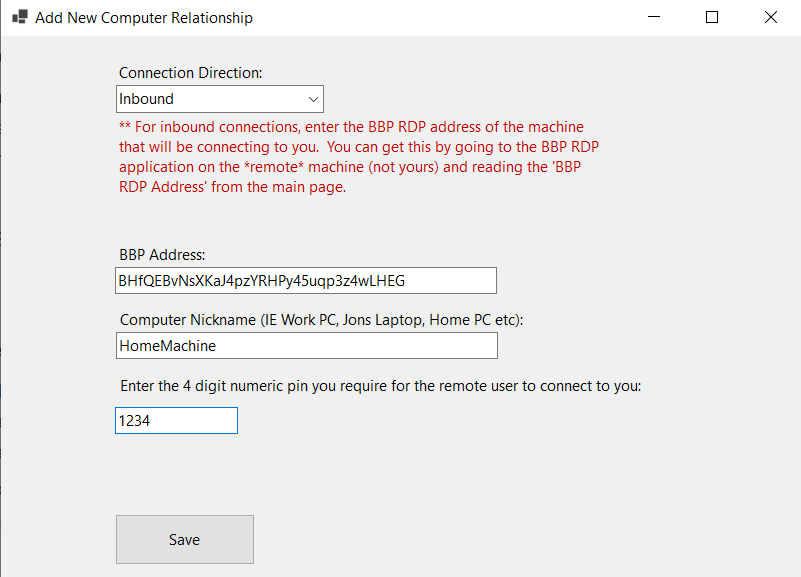</ins></div></td></tr>
<tr><td class='diff-marker'> </td><td style="background-color: #f8f9fa; color: #222; font-size: 88%; border-style: solid; border-width: 1px 1px 1px 4px; border-radius: 0.33em; border-color: #eaecf0; vertical-align: top; white-space: pre-wrap;"></td><td class='diff-marker'> </td><td style="background-color: #f8f9fa; color: #222; font-size: 88%; border-style: solid; border-width: 1px 1px 1px 4px; border-radius: 0.33em; border-color: #eaecf0; vertical-align: top; white-space: pre-wrap;"></td></tr>
<tr><td class='diff-marker'> </td><td style="background-color: #f8f9fa; color: #222; font-size: 88%; border-style: solid; border-width: 1px 1px 1px 4px; border-radius: 0.33em; border-color: #eaecf0; vertical-align: top; white-space: pre-wrap;"><div>Step 2:</div></td><td class='diff-marker'> </td><td style="background-color: #f8f9fa; color: #222; font-size: 88%; border-style: solid; border-width: 1px 1px 1px 4px; border-radius: 0.33em; border-color: #eaecf0; vertical-align: top; white-space: pre-wrap;"><div>Step 2:</div></td></tr>
</table>Adminhttps://wiki.biblepay.org/index.php?title=RDP&diff=6953&oldid=prevAdmin at 19:50, 18 August 20242024-08-18T19:50:55Z<p></p>
<table class="diff diff-contentalign-left" data-mw="interface">
<col class="diff-marker" />
<col class="diff-content" />
<col class="diff-marker" />
<col class="diff-content" />
<tr class="diff-title" lang="en">
<td colspan="2" style="background-color: #fff; color: #222; text-align: center;">← Older revision</td>
<td colspan="2" style="background-color: #fff; color: #222; text-align: center;">Revision as of 19:50, 18 August 2024</td>
</tr><tr><td colspan="2" class="diff-lineno" id="mw-diff-left-l1" >Line 1:</td>
<td colspan="2" class="diff-lineno">Line 1:</td></tr>
<tr><td class='diff-marker'>−</td><td style="color: #222; font-size: 88%; border-style: solid; border-width: 1px 1px 1px 4px; border-radius: 0.33em; border-color: #ffe49c; vertical-align: top; white-space: pre-wrap;"><div>You can use the BiblePay RDP <del class="diffchange diffchange-inline">service </del>to connect from one PC to another.  This is facilitated by the BiblePay network.  Your RDP traffic is encrypted and sent from PC1 to PC2 through a sanctuary.</div></td><td class='diff-marker'>+</td><td style="color: #222; font-size: 88%; border-style: solid; border-width: 1px 1px 1px 4px; border-radius: 0.33em; border-color: #a3d3ff; vertical-align: top; white-space: pre-wrap;"><div>You can use the BiblePay RDP <ins class="diffchange diffchange-inline">application </ins>to connect from one PC to another.  This is facilitated by the BiblePay network.  Your RDP traffic is encrypted and sent from PC1 to PC2 through a sanctuary.</div></td></tr>
<tr><td class='diff-marker'> </td><td style="background-color: #f8f9fa; color: #222; font-size: 88%; border-style: solid; border-width: 1px 1px 1px 4px; border-radius: 0.33em; border-color: #eaecf0; vertical-align: top; white-space: pre-wrap;"><div>Currently, this feature is free, but after it gains popularity BBP reserves the right to charge your BIBLEPAY key for the hours used.</div></td><td class='diff-marker'> </td><td style="background-color: #f8f9fa; color: #222; font-size: 88%; border-style: solid; border-width: 1px 1px 1px 4px; border-radius: 0.33em; border-color: #eaecf0; vertical-align: top; white-space: pre-wrap;"><div>Currently, this feature is free, but after it gains popularity BBP reserves the right to charge your BIBLEPAY key for the hours used.</div></td></tr>
<tr><td class='diff-marker'> </td><td style="background-color: #f8f9fa; color: #222; font-size: 88%; border-style: solid; border-width: 1px 1px 1px 4px; border-radius: 0.33em; border-color: #eaecf0; vertical-align: top; white-space: pre-wrap;"></td><td class='diff-marker'> </td><td style="background-color: #f8f9fa; color: #222; font-size: 88%; border-style: solid; border-width: 1px 1px 1px 4px; border-radius: 0.33em; border-color: #eaecf0; vertical-align: top; white-space: pre-wrap;"></td></tr>
</table>Adminhttps://wiki.biblepay.org/index.php?title=RDP&diff=6952&oldid=prevAdmin: Created page with "You can use the BiblePay RDP service to connect from one PC to another. This is facilitated by the BiblePay network. Your RDP traffic is encrypted and sent from PC1 to PC2 t..."2024-08-18T19:50:30Z<p>Created page with "You can use the BiblePay RDP service to connect from one PC to another. This is facilitated by the BiblePay network. Your RDP traffic is encrypted and sent from PC1 to PC2 t..."</p>
<p><b>New page</b></p><div>You can use the BiblePay RDP service to connect from one PC to another. This is facilitated by the BiblePay network. Your RDP traffic is encrypted and sent from PC1 to PC2 through a sanctuary.<br />
Currently, this feature is free, but after it gains popularity BBP reserves the right to charge your BIBLEPAY key for the hours used.<br />
<br />
Before beginning the tutorial let us discuss the moving parts.<br />
<br />
<br />
'''Part 1: The BiblePay Extensions Plugin Module'''<br />
<br />
BIBLEPAY Extensions is a program that extends the functionality of the core wallet. It is completely optional, meaning that you are not required to run this binary; you only need it if you want to use our enhanced features. Since many of our features are cutting edge and need upgraded regularly as they are enhanced, we have created the BIBLEPAY Extensions program to automatically upgrade your optional modules, ensuring they will work as bug fixes are released. The hierarchy of the program looks like this: Core Wallet launches Extensions. Extensions lists a bunch of extensions that are optional to use. As they are listed, the program will automatically upgrade any of them that need upgraded. To use an extension, click on the Connect button. <br />
<br />
'''How do I launch BiblePay RDP?'''<br />
<br />
Click "Extensions" from the left menu in BIBLEPAY core wallet. (This only works on PC's). Once Extensions loads, you will see a list of programs available to run. One of them is "BBPRDP". Click Connect on that entry to launch BBP RDP.<br />
<br />
<br />
<br />
<br />
'''Scenario 1, Setting up your Home machine to listen so you can connect to it from a remote PC:'''<br />
<br />
From the BBP RDP Application home page, click on Add New Computer Relationship.<br />
From the Add New Computer Relationship page, select Inbound for connection direction.<br />
Populate the BBP address field with the address of the "My BBP ADDRESS" field that is located on the *calling* machine's BBP RDP application (you will have to go to that machine and launch the BBP RDP app and copy the<br />
address to the clipboard found from the application home page).<br />
Populate a nickname.<br />
For the pin, select the 4 digit pin that you will choose to require the user to have that dials into your PC. Remember this 4 digit pin is required on the calling side.<br />
Click Save<br />
<br />
Step 2:<br />
From the calling machine, launch BBP RDP.<br />
Click Add new Computer Relationship.<br />
For direction, populate Outbound.<br />
For the BBP Address, populate the RDP address of the *server* (IE your home machine that is going to be listening for your call).<br />
Populate the nickname, and enter the correct 4 digit pin that the home pc requires for you to dial into it.<br />
Click Save.</div>Admin